'/%3e%3c!--%20Outer%20viewfinder%20brackets%20-%20thick,%20rounded%20--%3e%3cg%20fill='none'%20stroke='url(%23bracket)'%20stroke-width='10'%20stroke-linecap='round'%20stroke-linejoin='round'%3e%3c!--%20Top-left%20--%3e%3cpath%20d='M30,70%20L30,38%20Q30,30%2038,30%20L70,30'/%3e%3c!--%20Top-right%20--%3e%3cpath%20d='M130,30%20L162,30%20Q170,30%20170,38%20L170,70'/%3e%3c!--%20Bottom-left%20--%3e%3cpath%20d='M30,130%20L30,162%20Q30,170%2038,170%20L70,170'/%3e%3c!--%20Bottom-right%20--%3e%3cpath%20d='M130,170%20L162,170%20Q170,170%20170,162%20L170,130'/%3e%3c/g%3e%3c!--%20Inner%20viewfinder%20brackets%20-%20slightly%20thinner%20--%3e%3cg%20fill='none'%20stroke='url(%23bracket)'%20stroke-width='7'%20stroke-linecap='round'%20stroke-linejoin='round'%20opacity='0.7'%3e%3c!--%20Top-left%20--%3e%3cpath%20d='M60,92%20L60,68%20Q60,60%2068,60%20L92,60'/%3e%3c!--%20Top-right%20--%3e%3cpath%20d='M108,60%20L132,60%20Q140,60%20140,68%20L140,92'/%3e%3c!--%20Bottom-left%20--%3e%3cpath%20d='M60,108%20L60,132%20Q60,140%2068,140%20L92,140'/%3e%3c!--%20Bottom-right%20--%3e%3cpath%20d='M108,140%20L132,140%20Q140,140%20140,132%20L140,108'/%3e%3c/g%3e%3c!--%20Center%20dot%20/%20focus%20point%20--%3e%3ccircle%20cx='100'%20cy='100'%20r='5'%20fill='url(%23bracket)'%20opacity='0.5'/%3e%3c/svg%3e)
Why screenshot OCR matters
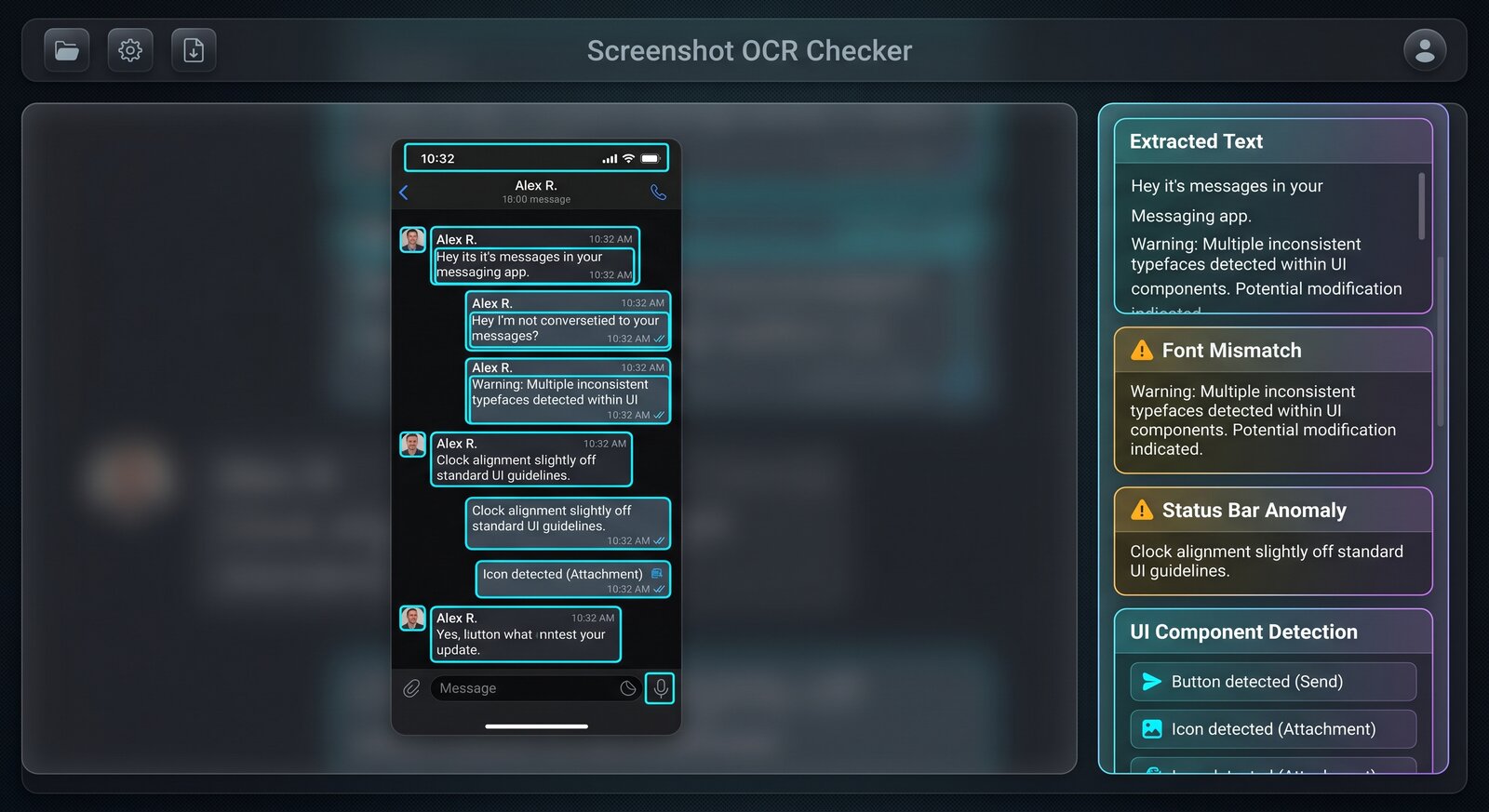
A screenshot claim often depends on text: chat messages, receipts, timestamps, usernames, prices, warnings, emails, or app notifications. OCR makes that text searchable and easier to compare. Img ID also identifies UI components so you can spot strange buttons, mismatched fonts, broken icons, and interface pieces that do not belong together.
- Extract chat text, usernames, prices, dates, warnings, and payment details.
- Spot UI elements that are misaligned, copied, or inconsistent with the app design.
- Review generated-screen artifacts such as fake icons, broken status bars, and odd labels.
- Compare OCR output against the visible screenshot before trusting the claim.
What Img ID cannot prove
A screenshot scan cannot confirm whether a message was sent, a payment happened, or an account exists. It can only inspect the pixels. Use it to decide whether a screenshot needs source verification: original export, message link, transaction ID, app record, or direct confirmation.
Best workflow
Upload the uncompressed screenshot when possible. Read the OCR text, inspect annotated UI components, then check the AI detection explanation. If the screenshot is cropped, ask for the surrounding context before making a decision.
Common screenshot red flags
Watch for inconsistent status bars, impossible notification times, copied message bubbles, broken app icons, blurry text pasted into sharp UI, and dates that do not match the surrounding conversation. Generated screenshots often get the broad layout right but miss small interface rules.
For disputes, ask for an export, screen recording, original message link, or system record. Img ID is useful because OCR makes the screenshot easier to audit, but it cannot confirm that the underlying event happened.