'/%3e%3c!--%20Outer%20viewfinder%20brackets%20-%20thick,%20rounded%20--%3e%3cg%20fill='none'%20stroke='url(%23bracket)'%20stroke-width='10'%20stroke-linecap='round'%20stroke-linejoin='round'%3e%3c!--%20Top-left%20--%3e%3cpath%20d='M30,70%20L30,38%20Q30,30%2038,30%20L70,30'/%3e%3c!--%20Top-right%20--%3e%3cpath%20d='M130,30%20L162,30%20Q170,30%20170,38%20L170,70'/%3e%3c!--%20Bottom-left%20--%3e%3cpath%20d='M30,130%20L30,162%20Q30,170%2038,170%20L70,170'/%3e%3c!--%20Bottom-right%20--%3e%3cpath%20d='M130,170%20L162,170%20Q170,170%20170,162%20L170,130'/%3e%3c/g%3e%3c!--%20Inner%20viewfinder%20brackets%20-%20slightly%20thinner%20--%3e%3cg%20fill='none'%20stroke='url(%23bracket)'%20stroke-width='7'%20stroke-linecap='round'%20stroke-linejoin='round'%20opacity='0.7'%3e%3c!--%20Top-left%20--%3e%3cpath%20d='M60,92%20L60,68%20Q60,60%2068,60%20L92,60'/%3e%3c!--%20Top-right%20--%3e%3cpath%20d='M108,60%20L132,60%20Q140,60%20140,68%20L140,92'/%3e%3c!--%20Bottom-left%20--%3e%3cpath%20d='M60,108%20L60,132%20Q60,140%2068,140%20L92,140'/%3e%3c!--%20Bottom-right%20--%3e%3cpath%20d='M108,140%20L132,140%20Q140,140%20140,132%20L140,108'/%3e%3c/g%3e%3c!--%20Center%20dot%20/%20focus%20point%20--%3e%3ccircle%20cx='100'%20cy='100'%20r='5'%20fill='url(%23bracket)'%20opacity='0.5'/%3e%3c/svg%3e)
What Img ID checks
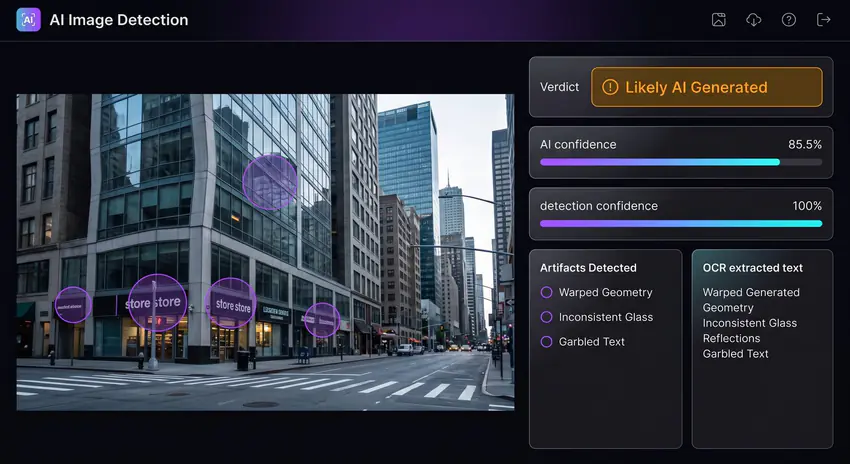
Modern image generators can create realistic portraits, product shots, memes, news-like photos, screenshots, and illustrations. A useful AI image detector needs to inspect more than one clue. Img ID combines visual analysis with OCR, component detection, and metadata review so the result is easier to audit.
- Visual artifacts such as warped hands, inconsistent shadows, fused objects, and unnatural textures.
- Text artifacts such as garbled signs, broken labels, fake watermarks, and odd UI copy.
- Parsed file metadata such as camera, software, date, and image dimensions when present.
- Context clues such as impossible reflections, repeated background faces, and fake camera depth.
How to read the result
Img ID keeps visual model confidence separate from verified provenance. Content Credentials, EXIF, file facts, OCR, and localized visual clues each show their own source and limits. A "likely AI" visual result remains model inference unless stronger provenance corroborates it. Screenshots, social compression, edits, and reposts can remove evidence, so missing signals stay neutral and the full stack matters more than one score.
Best use cases
Use Img ID for social posts, marketplace listings, dating profiles, screenshots, viral images, suspicious ads, school assignments, newsroom triage, and creator workflows where you need quick image authenticity context.
Why AI image detection is not perfect
AI detectors can make mistakes because real photos can be edited, compressed, upscaled, or stripped of metadata. Generated images can also include convincing camera data or be mixed with real photos. Img ID is built to show reasons so you can compare the verdict against visible evidence. For serious decisions, use multiple signals: source reputation, reverse image search, original file metadata, visual inspection, and direct confirmation from the publisher.