'/%3e%3c!--%20Outer%20viewfinder%20brackets%20-%20thick,%20rounded%20--%3e%3cg%20fill='none'%20stroke='url(%23bracket)'%20stroke-width='10'%20stroke-linecap='round'%20stroke-linejoin='round'%3e%3c!--%20Top-left%20--%3e%3cpath%20d='M30,70%20L30,38%20Q30,30%2038,30%20L70,30'/%3e%3c!--%20Top-right%20--%3e%3cpath%20d='M130,30%20L162,30%20Q170,30%20170,38%20L170,70'/%3e%3c!--%20Bottom-left%20--%3e%3cpath%20d='M30,130%20L30,162%20Q30,170%2038,170%20L70,170'/%3e%3c!--%20Bottom-right%20--%3e%3cpath%20d='M130,170%20L162,170%20Q170,170%20170,162%20L170,130'/%3e%3c/g%3e%3c!--%20Inner%20viewfinder%20brackets%20-%20slightly%20thinner%20--%3e%3cg%20fill='none'%20stroke='url(%23bracket)'%20stroke-width='7'%20stroke-linecap='round'%20stroke-linejoin='round'%20opacity='0.7'%3e%3c!--%20Top-left%20--%3e%3cpath%20d='M60,92%20L60,68%20Q60,60%2068,60%20L92,60'/%3e%3c!--%20Top-right%20--%3e%3cpath%20d='M108,60%20L132,60%20Q140,60%20140,68%20L140,92'/%3e%3c!--%20Bottom-left%20--%3e%3cpath%20d='M60,108%20L60,132%20Q60,140%2068,140%20L92,140'/%3e%3c!--%20Bottom-right%20--%3e%3cpath%20d='M108,140%20L132,140%20Q140,140%20140,132%20L140,108'/%3e%3c/g%3e%3c!--%20Center%20dot%20/%20focus%20point%20--%3e%3ccircle%20cx='100'%20cy='100'%20r='5'%20fill='url(%23bracket)'%20opacity='0.5'/%3e%3c/svg%3e)
Why screenshot OCR matters
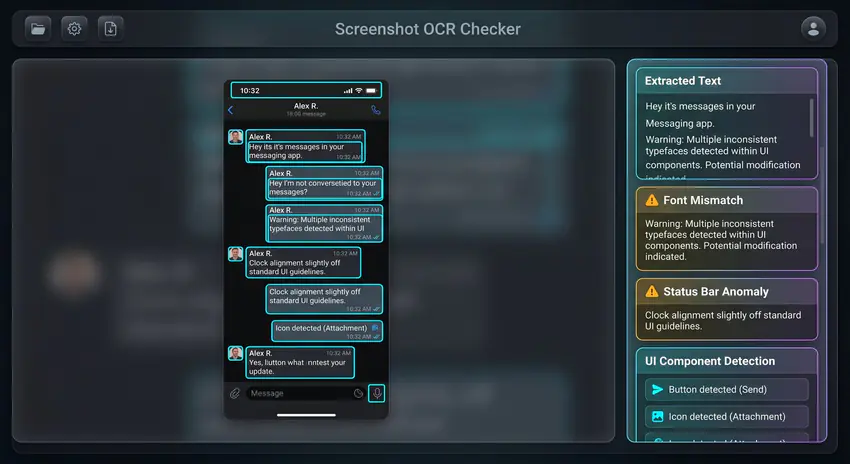
A screenshot claim often depends on text: chat messages, receipts, timestamps, usernames, prices, warnings, emails, or app notifications. OCR makes that text searchable and easier to compare. Img ID also identifies UI components so you can spot strange buttons, mismatched fonts, broken icons, and interface pieces that do not belong together.
- Extract chat text, usernames, prices, dates, warnings, and payment details.
- Spot UI elements that are misaligned, copied, or inconsistent with the app design.
- Review generated-screen artifacts such as fake icons, broken status bars, and odd labels.
- Compare OCR output against the visible screenshot before trusting the claim.
Checks people run most often
Chat screenshots
Extract names, timestamps, message text, and status-bar clues before trusting a DM, support thread, or viral post.
Payment screenshots
Review totals, account labels, dates, QR codes, receipt lines, font mismatches, and app UI pieces that may have been edited.
App warnings and emails
Check copied alerts, login prompts, policy notices, and email screenshots for OCR mismatches and generated-interface artifacts.
What Img ID cannot prove
A screenshot scan cannot confirm whether a message was sent, a payment happened, or an account exists. It can only inspect the pixels. Use it to decide whether a screenshot needs source verification: original export, message link, transaction ID, app record, or direct confirmation.
Best workflow
Upload the uncompressed screenshot when possible. Read the OCR text, inspect annotated UI components, then check the AI detection explanation. If the screenshot is cropped, ask for the surrounding context before making a decision.
Example: checking a suspicious chat screenshot
- Copy OCR output and confirm names, message order, timestamps, and visible URLs.
- Compare bubble spacing, avatar shapes, font weights, and status-bar layout with the real app.
- Review AI and component findings for malformed icons, repeated elements, or pasted text blocks.
- Ask for an original message link, export, screen recording, or account record before deciding.
Example outcome: mismatched typography is a reason to verify the source, not proof that the conversation is fake.
Common screenshot red flags
Watch for inconsistent status bars, impossible notification times, copied message bubbles, broken app icons, blurry text pasted into sharp UI, and dates that do not match the surrounding conversation. Generated screenshots often get the broad layout right but miss small interface rules.
For disputes, ask for an export, screen recording, original message link, or system record. Img ID is useful because OCR makes the screenshot easier to audit, but it cannot confirm that the underlying event happened.
Screenshot checker FAQ
Can OCR prove a screenshot is real?
No. OCR extracts visible text and helps compare the claim against the pixels. Use it with source records, original files, message links, or account data before trusting a screenshot.
How can I check whether a Discord or chat screenshot is fake?
Extract the text, compare fonts and spacing, inspect timestamps and status-bar details, then verify the messages against an original link, export, or account record. Pixel analysis alone cannot prove that a message was sent.
What screenshot should I upload?
Upload the highest-resolution, least-compressed screenshot available. Cropped or recompressed screenshots can hide useful OCR, layout, and metadata signals.