'/%3e%3c!--%20Outer%20viewfinder%20brackets%20-%20thick,%20rounded%20--%3e%3cg%20fill='none'%20stroke='url(%23bracket)'%20stroke-width='10'%20stroke-linecap='round'%20stroke-linejoin='round'%3e%3c!--%20Top-left%20--%3e%3cpath%20d='M30,70%20L30,38%20Q30,30%2038,30%20L70,30'/%3e%3c!--%20Top-right%20--%3e%3cpath%20d='M130,30%20L162,30%20Q170,30%20170,38%20L170,70'/%3e%3c!--%20Bottom-left%20--%3e%3cpath%20d='M30,130%20L30,162%20Q30,170%2038,170%20L70,170'/%3e%3c!--%20Bottom-right%20--%3e%3cpath%20d='M130,170%20L162,170%20Q170,170%20170,162%20L170,130'/%3e%3c/g%3e%3c!--%20Inner%20viewfinder%20brackets%20-%20slightly%20thinner%20--%3e%3cg%20fill='none'%20stroke='url(%23bracket)'%20stroke-width='7'%20stroke-linecap='round'%20stroke-linejoin='round'%20opacity='0.7'%3e%3c!--%20Top-left%20--%3e%3cpath%20d='M60,92%20L60,68%20Q60,60%2068,60%20L92,60'/%3e%3c!--%20Top-right%20--%3e%3cpath%20d='M108,60%20L132,60%20Q140,60%20140,68%20L140,92'/%3e%3c!--%20Bottom-left%20--%3e%3cpath%20d='M60,108%20L60,132%20Q60,140%2068,140%20L92,140'/%3e%3c!--%20Bottom-right%20--%3e%3cpath%20d='M108,140%20L132,140%20Q140,140%20140,132%20L140,108'/%3e%3c/g%3e%3c!--%20Center%20dot%20/%20focus%20point%20--%3e%3ccircle%20cx='100'%20cy='100'%20r='5'%20fill='url(%23bracket)'%20opacity='0.5'/%3e%3c/svg%3e)
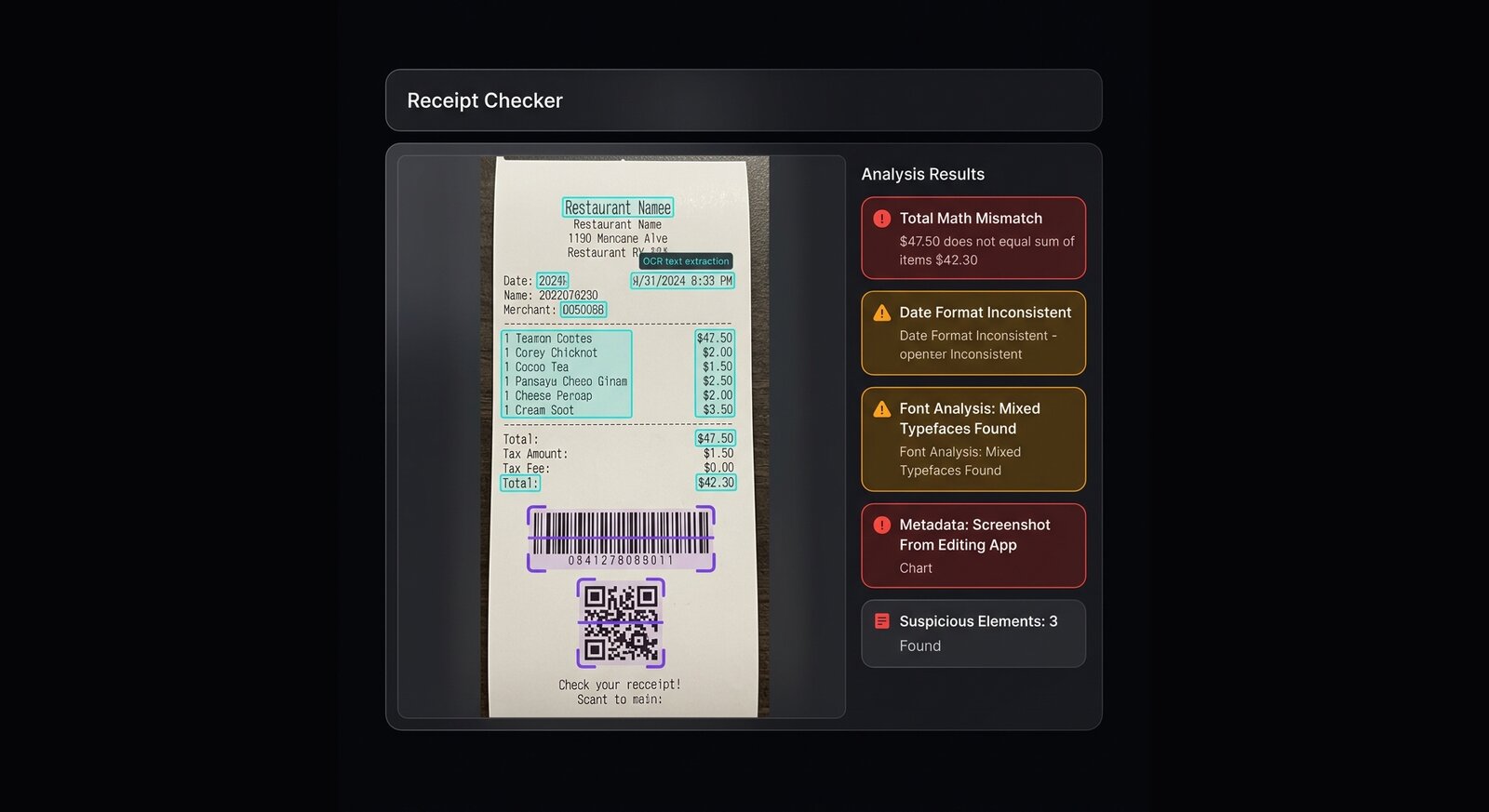
What Img ID can catch
Img ID extracts text and highlights visual components. That is useful for receipt review because the suspicious signal may be in typography, spacing, totals, dates, or generated text. AI image detection adds another layer when the receipt appears to be created as an image instead of captured from a real document.
- OCR text that exposes mismatched dates, merchant names, totals, or currency symbols.
- Layout inconsistencies such as uneven columns, repeated rows, and warped paper edges.
- Metadata clues showing screenshot export, editing software, or missing camera information.
- Generated-image artifacts around logos, QR codes, barcodes, and tiny text.
Limitations
Img ID cannot verify a transaction against a bank, store, payment provider, or accounting system. It can only inspect image evidence. For disputes, use the scan as triage and then verify directly with the merchant, payment processor, order ID, or original PDF.
Practical workflow
Upload the highest-resolution file, compare OCR output with the visible receipt, check totals manually, then look at metadata and visual explanation. If the receipt matters financially, ask for a source PDF or transaction record rather than relying on a screenshot.
Signals outside the image
Compare the receipt against order history, merchant emails, payment processor records, shipping status, and bank statements. Watch for screenshots that hide the transaction ID, crop out sender details, or show a status that does not match the claimed refund or purchase.
For business workflows, keep Img ID results with the original file and reviewer notes. The scan can show why a receipt looked suspicious, but final approval should come from source-system data, not a visual detector alone.